You can reply to an email using Mozilla Thunderbird instead of the cPanel Webmail.
1. Open Mozilla Thunderbird.![]()
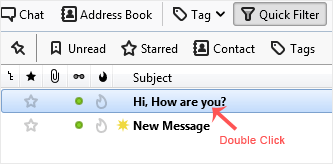
2. Click on the email you wish to open twice.
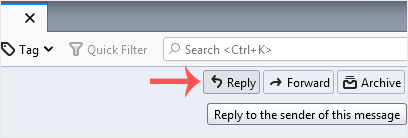
3. In the top-bottom area, click on Reply.
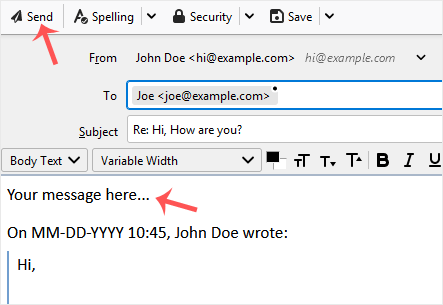
4. Type your message in the message box and click on Send.
- Home
-
Store
- Browse All
- Linux Shared Hosting
- DirectAdmin Shared Hosting
- Windows Shared Hosting
- Linux Reseller Hosting
- DirectAdmin Reseller Hosting
- Windows Reseller Hosting
- linux Cloud VPS
- VPS Windows Cloud Servers
- Wordpress Hosting
- SSL Certificates
- Business Email Solutions
- Enterprise Email Solutions
- Email Solutions
- Dedicated Servers USA
- Dedicated Servers India
- Weebly Website Builder
- Google Workspace
- OX Business Email US
- OX Enterprise Email US
- Register a New Domain
- Transfer Domains to Us
- Announcements
- Knowledgebase
- Network Status
- Contact Us
-
More