BoxTrapper requires all email senders not on your Whitelist to respond to verification emails. It protects you from spam.
If you want to get rid of unwanted emails, enable Boxtrapper either on all emails or just selected emails and configure it.
1. Log in to your cPanel Account,
2. In the Email section, click on BoxTrapper.

![]()
3. On the BoxTrapper's page, you see a list of your emails under the Account heading and the status of BoxTrapper under the Status heading. Choose Manage.
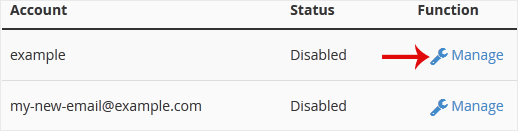
4. On the BoxTrapper's Manage page, if the status is Disabled, Choose Enable.
- Home
-
Store
- Browse All
- Linux Shared Hosting
- DirectAdmin Shared Hosting
- Windows Shared Hosting
- Linux Reseller Hosting
- DirectAdmin Reseller Hosting
- Windows Reseller Hosting
- linux Cloud VPS
- VPS Windows Cloud Servers
- Wordpress Hosting
- SSL Certificates
- Business Email Solutions
- Enterprise Email Solutions
- Email Solutions
- Dedicated Servers USA
- Dedicated Servers India
- Weebly Website Builder
- Google Workspace
- OX Business Email US
- OX Enterprise Email US
- Register a New Domain
- Transfer Domains to Us
- Announcements
- Knowledgebase
- Network Status
- Contact Us
-
More